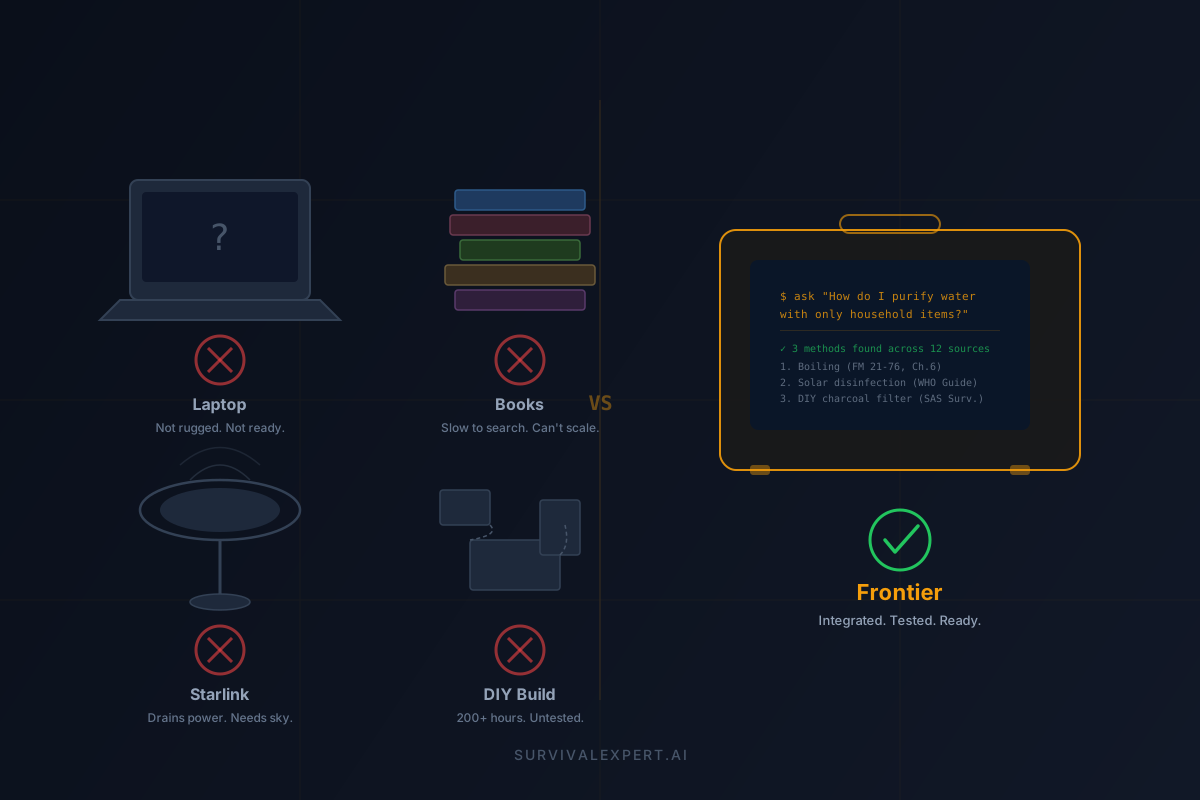
Why Not Just Use a Laptop? (Or Books. Or Starlink. Or DIY.)
It's the first question everyone asks. Fair enough — it deserves a real answer, not a sales pitch.
You're looking at the Frontier and thinking: "I already have a laptop. I have books. I could set up Starlink. I could probably build something like this myself for less." Each of those thoughts is reasonable. Each of those alternatives is useful. And each one has a specific failure mode that shows up at exactly the wrong time.
The Real Question Isn't "Can It Work?"
Of course a laptop can store files. Of course books contain knowledge. Of course Starlink provides internet. The question isn't capability on a Tuesday afternoon with good weather and wall power.
The question is: will it work at 2 AM in a freezing house with no grid power, no cell signal, shaking hands, and a family counting on you to figure out the next move?
That's a different engineering problem. Let's walk through each alternative honestly.
Option 1: "I'll Just Use My Laptop"
Your MacBook or ThinkPad is a phenomenal machine. For daily work, it's unbeatable. But consumer laptops are designed for climate-controlled environments with reliable power — offices, coffee shops, living rooms. They're not designed for the conditions where a survival system actually gets used.
Where laptops break down
Durability. Consumer laptops have IP ratings of... nothing. No water resistance, no dust protection, no shock rating. Drop it off a tailgate, splash it near the water purification setup you're building, or use it in blowing dust — and you're down to zero capability. The Frontier sits inside a Pelican 1615 Air case — IP67 rated (waterproof, crushproof, dustproof), MIL-STD-810 certified, with a limited lifetime warranty from Pelican Products. It's designed to survive the environment you'd actually use it in.
Operating temperature. Most laptops spec 50–95°F (10–35°C). Below freezing or above 95°F, they thermal-throttle, shut down, or suffer battery damage. Emergencies don't check the weather first.
The "DIY offline AI" tax. Getting a local LLM running on a laptop is doable — if you're comfortable with terminal commands, model quantization, Python environments, GGUF files, and prompt engineering. Now add a retrieval-augmented generation pipeline pointed at 1,097 survival manuals. Then make sure it actually returns useful, cited answers instead of hallucinations. That's not a weekend project. It's an engineering effort, and it needs to work the first time you open it under stress.
Power budget. A laptop gives you 6–10 hours on a charge, then it's dead weight. The Frontier's Jackery Explorer 240 v2 (256Wh, LiFePO4 battery) delivers 8+ hours of active runtime. The math: Apple's Mac mini M4 draws 15–25W under AI workload. At 20W average, 256Wh ÷ 20W = 12.8 hours theoretical, ~8+ hours real-world with display and peripherals. Recharge from wall, car (12V), or solar panel — and LiFePO4 chemistry means 3,000+ charge cycles before meaningful degradation.
Verdict: A laptop is a great general-purpose machine. But "general purpose" means "optimized for nothing." In a survival scenario, you want a system that was purpose-built for exactly this — rugged, pre-loaded, pre-tested, and ready to answer questions the moment you open it.
Option 2: "Books Don't Need Batteries"
This is true, and we're not going to argue against books. A well-curated physical library is one of the most reliable knowledge stores humans have ever invented. Zero boot time. No failure modes except fire and water. We respect books.
But let's be honest about what books can't do:
The limits of printed knowledge
Speed to answer. You have a child with a 103°F fever, no pediatrician reachable, and you need to know: at what threshold do you treat with acetaminophen vs. seek emergency care? Which book is it in? What chapter? What page? Under stress, scanning an index and flipping pages burns time you may not have. A natural-language query — "child has 103 fever, when is it an emergency" — returns a sourced, specific answer in seconds.
Scale. 1,097 manuals. That's roughly 200,000+ pages across 14 domains. You're not carrying that in a bag. You're not carrying a tenth of it. A physical survival library of even 20 solid references weighs 30–40 lbs and takes up a shelf. The Frontier puts all 1,097 in a searchable, indexed, AI-queryable system at 24 lbs total (computer, display, power, and case included).
Cross-referencing. Your real-world problem almost never maps to a single chapter. "I need to purify water, but I only have these materials, and one family member has a chlorine allergy" spans water treatment, chemistry, and medical references simultaneously. An LLM with RAG synthesizes across all 1,097 sources in one answer. With books, that's three open manuals, six bookmarks, and a prayer.
Low-light conditions. Outages mean darkness. Reading a book by flashlight or candle is possible but slow, eye-straining, and a fire hazard. The Frontier's 15.7" backlit display is readable in any lighting condition.
Verdict: Keep your books. Seriously. They're your zero-power backup. But think of the Frontier as a survival library that talks back — 1,097 manuals you can interrogate in plain English, with source references you can verify. Books and AI aren't either/or. They're layers.
Option 3: "Starlink Gives Me Internet Anywhere"
Starlink is impressive technology. A satellite internet terminal that works almost anywhere with clear sky view, delivering 50–200 Mbps. If you have Starlink, you can access cloud AI (ChatGPT, Claude, Gemini), any website, video calls — the full internet. So why would you need an offline system?
Starlink's real-world constraints
Power draw. Starlink's own spec sheets show the standard dish pulls 75–100W continuously. That's 1.8–2.4 kWh per day. A Jackery 240 v2 (256Wh) would run Starlink for about 2.5–3.5 hours, then it's dead — and so is everything else connected to it. Apple lists the Mac mini M4 at 5W idle, up to 65W max — under typical AI inference it runs 15–25W. That's 3–5x more efficient than feeding a satellite dish, which means 8+ hours of runtime from the same battery. Starlink solves connectivity. It doesn't solve power budgeting.
Sky view requirement. Starlink needs an unobstructed view of the sky. Inside a building, under dense tree cover, in a canyon, or in a vehicle — no connection. The Frontier works inside a closet, a basement, a car trunk. It doesn't care about the sky because it doesn't need the sky.
Setup time and complexity. Starlink requires a dish placement with good sky view, a power source, a router, and a warm-up period of several minutes for satellite acquisition. In a sudden emergency — earthquake, tornado aftermath, wildfire evacuation — you don't have setup time. The Frontier's startup sequence: open case, press power, ask your question.
It solves the wrong problem. Starlink gives you internet access. But in a survival scenario, the problem isn't "I need to browse the web." It's "I need an expert answer to a specific survival question, right now, from a trusted source." Cloud AI services may be overloaded during a regional emergency. Websites may be down. Your subscription may have lapsed. The Frontier's knowledge base is local, permanent, and subscription-free.
Verdict: Starlink is excellent for communication and connectivity in remote areas. If you have one, great — use it for contacting family, getting news updates, and coordinating help. But don't confuse internet access with survival knowledge access. They're different needs with different reliability profiles.
Option 4: "I Could Build This Myself for Less"
You probably could. If you're technically skilled enough to be considering it, you're exactly the kind of person who could source a mini PC, find a rugged case, select a battery, install an LLM runtime, download and index a survival library, build a RAG pipeline, tune the prompts, test it under load, and package it all into a field-ready system.
The question isn't whether you can. It's whether you should — and what you're actually optimizing for.
The hidden costs of DIY
Time. Researching components, purchasing, assembling, installing OS and AI stack, downloading and processing 1,097 manuals into a vector database, testing retrieval quality, building a usable interface, and iterating until it actually works well — that's 80–200 hours of skilled labor. At any reasonable hourly rate, the "savings" evaporate quickly.
The knowledge base problem. Where do you get 1,097 survival manuals? Which ones are trustworthy? How do you deduplicate, categorize, chunk, and embed them for retrieval? What chunk size gives the best answer quality? How do you handle PDFs with tables, diagrams, and mixed formatting? This is the hardest part of the entire system, and it's invisible until you try it.
Testing under pressure. You built it on a Saturday. It worked great on your desk. But have you tested it at 15°F? At 105°F? After being bounced around in a truck bed? With dirty hands on the keyboard? After sitting unused for 6 months — does it still boot and work? Integrated systems get tested as systems. DIY builds get tested as components, and the gaps show up in the field.
Maintenance burden. Models get updated. Libraries need reindexing. OS updates can break things. A battery degrades and needs replacement. With a product, you get updates and support. With DIY, you are the support — and you'll need to be available when something breaks, which tends to be at the worst possible time.
Trust under stress. This is the one nobody talks about. When you're sleep-deprived, cold, and your family is depending on you, do you trust the thing you cobbled together last summer? Or do you want a system that was engineered, tested, and documented specifically for this moment? Confidence in your equipment isn't a luxury in an emergency. It's a survival factor.
Verdict: If you enjoy the build, go for it — you'll learn a tremendous amount. But if the goal is a reliable, field-ready system you'd trust your family's safety to, the economics and reliability math favor a purpose-built, tested product. Same reason most people don't weld their own fire extinguishers.
The Honest Comparison
| Requirement | Laptop | Books | Starlink | DIY | Frontier |
|---|---|---|---|---|---|
| Works offline | ⚠️ | ✅ | ❌ | ✅ | ✅ |
| Rugged / weather-rated | ❌ | ⚠️ | ⚠️ | ⚠️ | ✅ |
| AI-powered answers | ⚠️ | ❌ | ✅ | ⚠️ | ✅ |
| 1,097 survival manuals | ❌ | ❌ | ❌ | ⚠️ | ✅ |
| 8+ hours battery | ⚠️ | ✅ | ❌ | ⚠️ | ✅ |
| Solar / car rechargeable | ⚠️ | N/A | ⚠️ | ⚠️ | ✅ |
| Fast natural-language search | ⚠️ | ❌ | ✅ | ⚠️ | ✅ |
| No subscription required | ✅ | ✅ | ❌ | ✅ | ✅ |
| Ready out of the box | ❌ | ✅ | ⚠️ | ❌ | ✅ |
The Word That Changes the Math
The word is integrated.
A laptop is a computer. Books are knowledge. Starlink is connectivity. A battery is power. Each one is a component. The Frontier is a system — every component selected, tested, and optimized to work together for one specific job: giving you expert survival guidance when everything else has failed.
Every component choice in the Frontier is a deliberate tradeoff:
Component-level specs (all cross-checkable)
Apple Mac mini M4 — 10-core CPU, 10-core GPU, 16GB unified memory. Apple lists it at 1.5 lb, 5W idle / 65W max. Runs Hermes 7B with RAG at 15–25W sustained. Chosen for the intersection of AI capability and power efficiency.
Pelican 1615 Air — IP67 waterproof, crushproof, dustproof. MIL-STD-810 certified. Limited lifetime warranty from Pelican Products. Internal dimensions fit the compute core, 15.7" display, keyboard, trackpad, and power station in a single carry unit.
Jackery Explorer 240 v2 — 256Wh capacity, LiFePO4 battery (3,000+ cycle life), 300W output. Recharge via wall outlet, 12V car adapter, or solar panel. At 20W average draw: ~12.8h theoretical, 8+ hours real-world with display and peripherals running.
Hermes 7B running locally with retrieval-augmented generation (RAG) across 1,097 indexed survival manuals. Chosen for the balance of reasoning quality and inference speed at this hardware level. Answers include source references so you can verify against the original manual.
15.7" integrated display with keyboard and trackpad. Native SwiftUI app, full-screen, auto-launches on power-up. No login screen, no OS navigation. Open case → press power → ask your question.
~24 lbs total — computer, display, keyboard, battery, case. Comparable to a loaded daypack. Ships ready to deploy.
None of those choices are obvious. Each one is the result of a tradeoff analysis. And together, they produce something none of the individual components can: a trusted, tested, grab-and-go decision-support system for when the infrastructure you normally rely on isn't there.
Built in Austin, TX. Starting from $2,499.
So, Should You Buy One?
If you're technically proficient, enjoy building things, and want a weekend project — build your own. You'll learn a lot, and you'll end up with something functional. We're not threatened by DIY. The knowledge should be accessible.
If you want a system that's ready to deploy the day it arrives — tested, documented, pre-loaded with 1,097 manuals across every survival domain, packaged in a case you can throw in a truck bed, powered by a battery you can recharge from the sun — that's what the Frontier is.
Either way, the worst option is having no plan at all.
What the Frontier Is and Isn't
Transparency matters — especially for a product people might depend on in emergencies:
What it is
- ✅ An offline decision-support and reference tool
- ✅ A searchable library of 1,097 survival manuals with AI synthesis
- ✅ A ruggedized, power-managed, grab-and-go system
- ✅ Answers with source references you can verify
- ✅ Subscription-free — no recurring costs, no cloud dependency
What it isn't
- ❌ Not a replacement for professional emergency services
- ❌ Not medical advice — it's guidance from published references
- ❌ Not a communication device (pair it with a radio for that)
- ❌ Not indestructible — it's ruggedized, but treat it like important equipment
The Frontier is a guidance tool. When cell towers are down and Google isn't available, it gives you the best available answer from the best available sources. Always call 911 first if you can. This is for when you can't.
Real-World Scenarios Where This Matters
Infrastructure failure isn't hypothetical. It's regional, seasonal, and predictable:
🇺🇸 United States
Hurricane season knocks out power for days to weeks across the Gulf Coast. Wildfires in the West trigger evacuations with zero notice. Tornado Alley sees grid damage yearly. FEMA recommends 72-hour self-sufficiency — but many outages last longer.
🇬🇧 United Kingdom
Winter storms cause widespread power cuts — the UK saw 1 million+ homes lose power in Storm Arwen (2021), some for over a week. Flood warnings across lowland areas create shelter-in-place scenarios with limited access to services.
🇨🇦 Canada
Ice storms (1998 Quebec: 4+ weeks without power for some), extreme cold snaps, and remote cabin living. Winter blackouts combine power loss with freezing temperatures — a compound emergency where knowledge access is critical.
🇦🇺 Australia
Bushfire season forces rapid evacuations. Heatwave blackouts create dangerous indoor temperatures. Cyclone prep in Queensland means days of isolation. The tyranny of distance means help takes longer to arrive.
Which Option Is Right for You?
Do you need guidance that works with no internet?
No → Internet-first options (Starlink + device) may work, but plan for outages.
Yes → Continue ↓
Do you need fast Q&A across many manuals (not just a few books)?
No → A small curated binder or a few key printed guides may be enough.
Yes → Continue ↓
Do you need rugged portability + dedicated power?
No → A laptop + offline PDFs + power bank could work (more DIY effort required).
Yes → The Frontier is built for exactly this.
Frequently Asked Questions
Does an offline AI system really matter if emergencies are rare?
How do I know I can trust the AI's guidance?
What about AI hallucinations?
How much power does "staying connected" really take?
How much water should I store for an emergency?
How long does food last in a refrigerator during a power outage?
Related Reading
Early Access
Join the Frontier Waitlist
Be first in line when the Frontier ships. Early access members get priority pricing starting at $2,499.
Get Early Access